Flame#
Procedure#
Turn on the computer and the instrument.
Open SpectrAA
Select new worksheet -> “data”
Add method
Load the method from the cookbook based on the sample element you are analzying
Choose checked box labeled “Flame”
Edit the method based the cookbook added
Once the new method is open, click on edit method.
Once the edit method is clicked, a pop-up will appear labeled method.
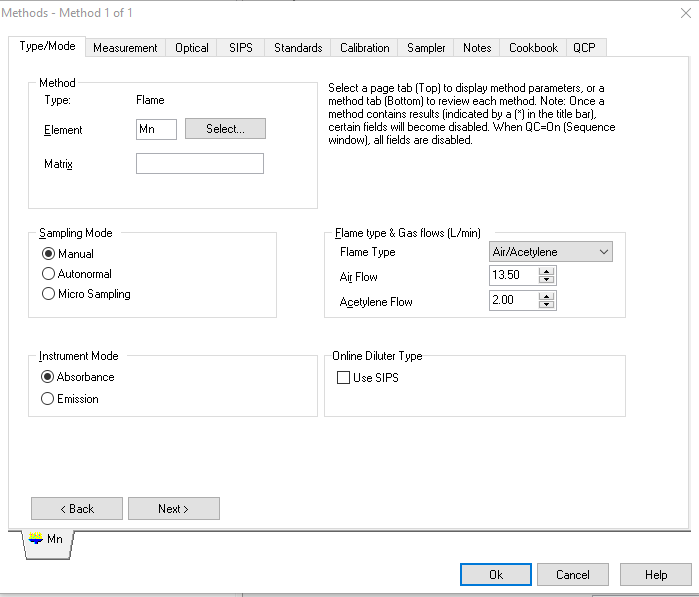
Under the first tab labeled type/mode, ensure the desired element is selected. Under this tab, ensure that sampling mode is set to manual and instrument mode is set to absorbance.
Click next. Under the measurement tab, choose standard curve.
When you get to the optical tab, you can add your desired wavelength.
Under standards, enter the concentrations of the standards you prepared.
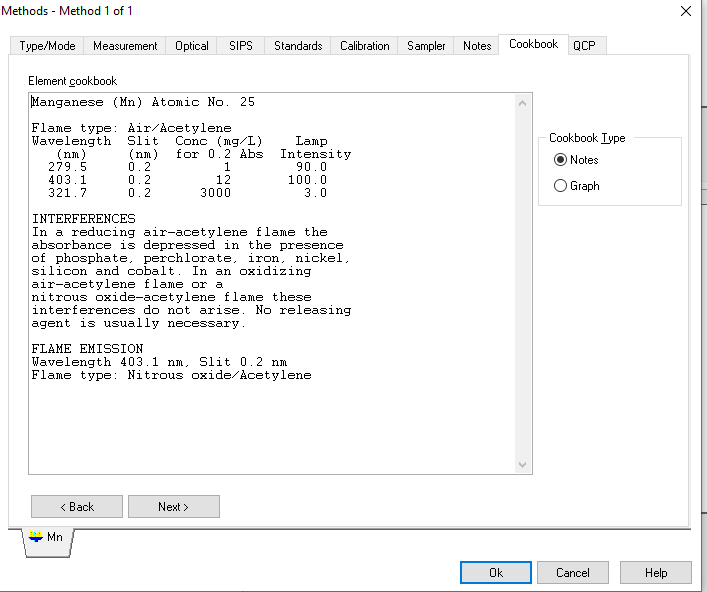
Before closing out of the edit method, make sure to look at the lab labeled cookbook to ensure there are no interferences that would affect the sample.
How to anaysize the sample
Press the start button under analysis
Ignite the flame
Insert the blank/zero into the instrument
Follow promts as given by the instrument showing when to measure known and unknown samples (You may have to wait about a minuite between measurements)
Save the analysis to a known file
How to shutdown the instrument
Caution
These directions are not correct! See Dr. McCurry for details and submit a fix!
At the main tank valve shut off the acetylene, then wait while line purges and flame burns out
Turn off the air, and allow excess pressure to bleed out
Turn the lamp current to zero
Power off the instrument